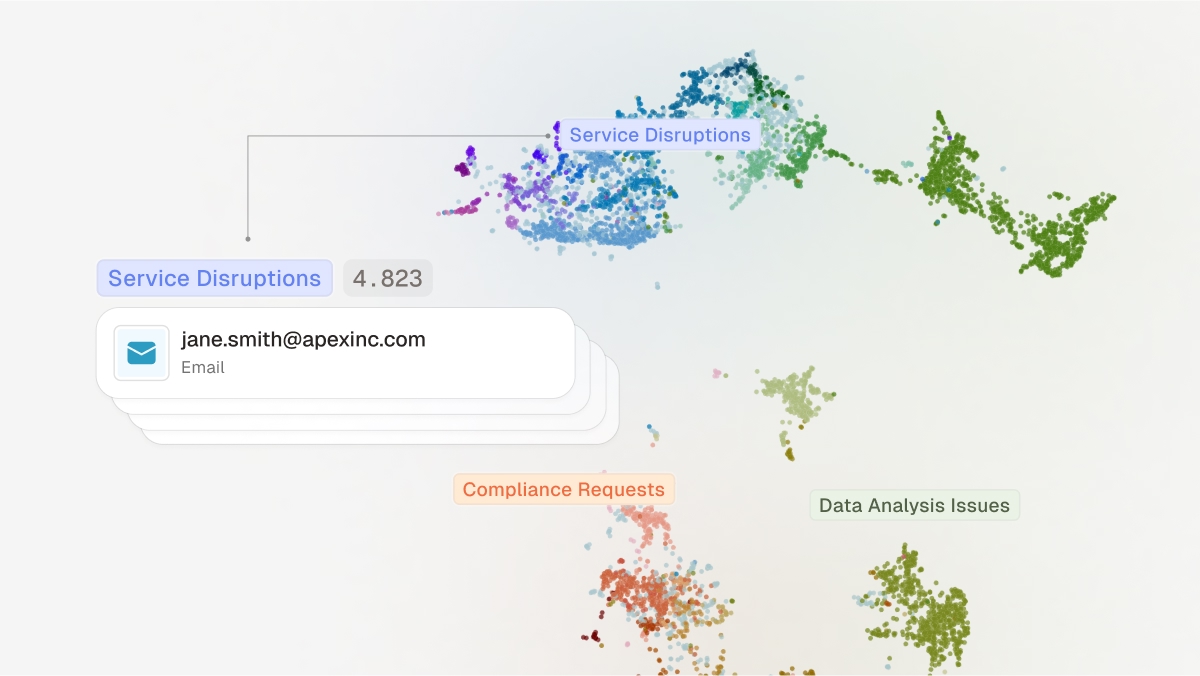
Why most teams miss the signal
Every day, organizations process massive volumes of unstructured text: customer emails, help-desk tickets, internal documents, chat logs, feedback forms, policy notices, and more. It is not just the quantity, but also the diversity and noisiness that makes this data hard to manage.
Teams often organize unstructured data using tags, buckets, spaces, or static categories. This helps with routing and reporting, but it still does not create a high-resolution view of what is actually happening: what is spiking this week, which themes are growing, and what to fix first.
The reality is that static categories and scattered dashboards hide the signal. Leaders need a living picture of which problems are growing now, what is driving them, and how to respond consistently.
Customer requests might be classified into broad buckets such as Billing & Payments, Technical Support, or Service Outages. These buckets are useful, but they are coarse and often lag real customer sentiment. Teams typically see counts by category, but not cluster-level patterns or theme-level changes over time. Without advanced text analytics, businesses struggle to identify strengths, improvement areas, and data-driven actions from customer feedback.
The opportunity is hiding in plain sight: every customer support team already owns a goldmine of past tickets and the responses that resolved them. Structured into clusters and themes, this “corporate memory” gives operators and management a real-time view of their operation at scale. Just as importantly, it provides the foundation for LLM-based agents that can handle new issues more effectively.
In this post, we will walk through a public dataset, explain the approach in plain language, and share the metrics that make the result useful.
A quick, real-world walkthrough
Most support teams handle tickets reactively. A human agent receives a customer’s message, tries to craft the best reply on the spot, and moves on. The problem is that there is no easy way to know if a colleague solved the same issue twenty minutes ago, or if it is a new type of problem that should be documented and shared. Valuable knowledge gets buried inside individual inboxes and chat threads.
To reduce chaos, companies often introduce manual categories such as “Technical Support” or “Product Support” to count and route tickets. This helps, but it has serious limitations:
- Categories are static and too broad.
- They rarely capture root causes or emerging patterns.
- Teams still spend time reinventing answers instead of reusing knowledge.
The result is a workflow that feels like firefighting: every problem is solved ad hoc, without the benefit of collective memory or a high-level overview of what is really happening.
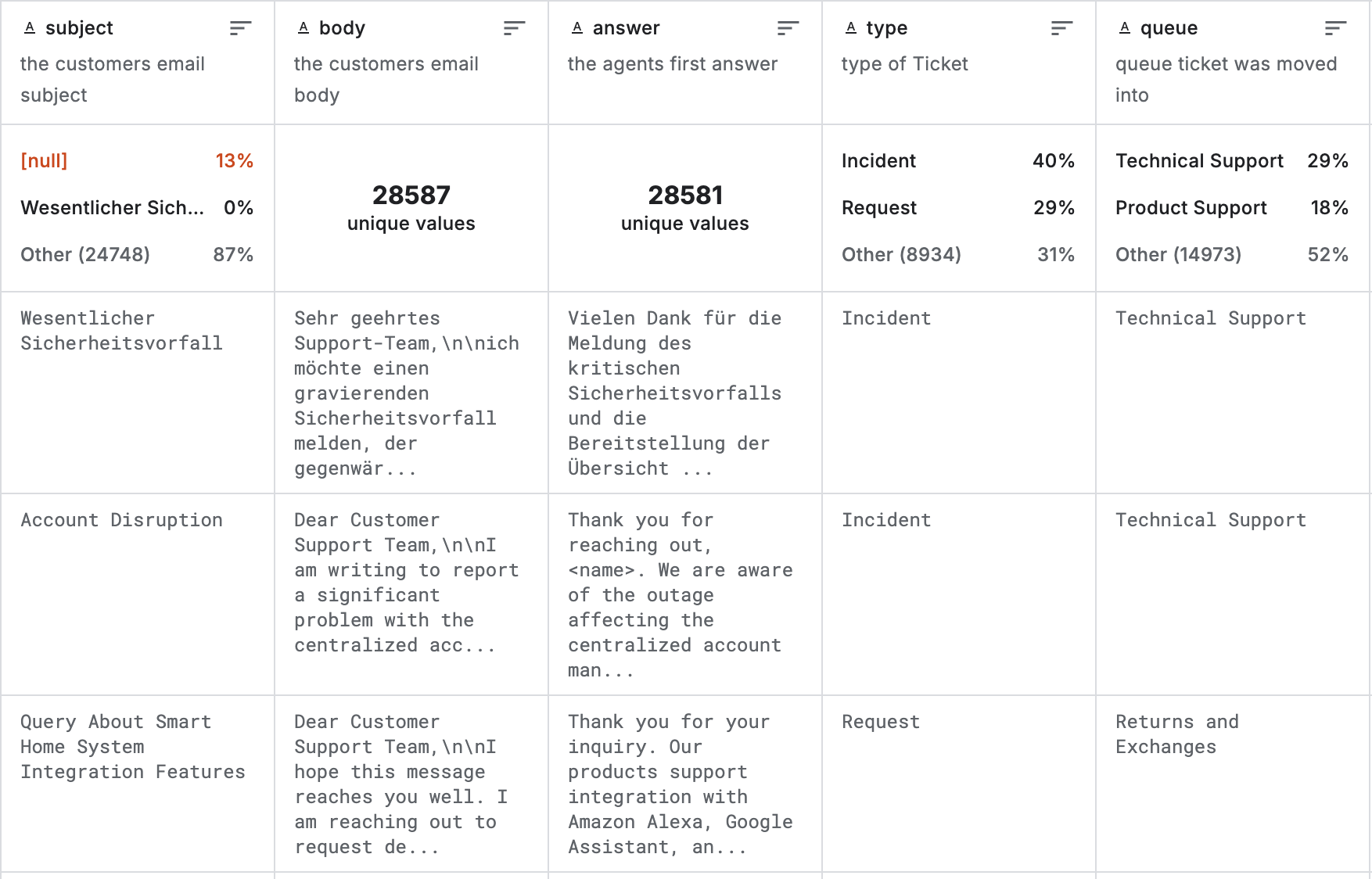
Table 1: Dataset structure with the customer’s email subject and body, the first support reply, and internal metadata such as request type and category.
For this walkthrough, we use the public Customer IT Support - Ticket Dataset. It contains around 30,000 customer support exchanges, where each record captures a customer email and the company’s first reply.
Now let’s turn it into an actionable view and analyze the top-level problems first.
Identifying critical problem clusters
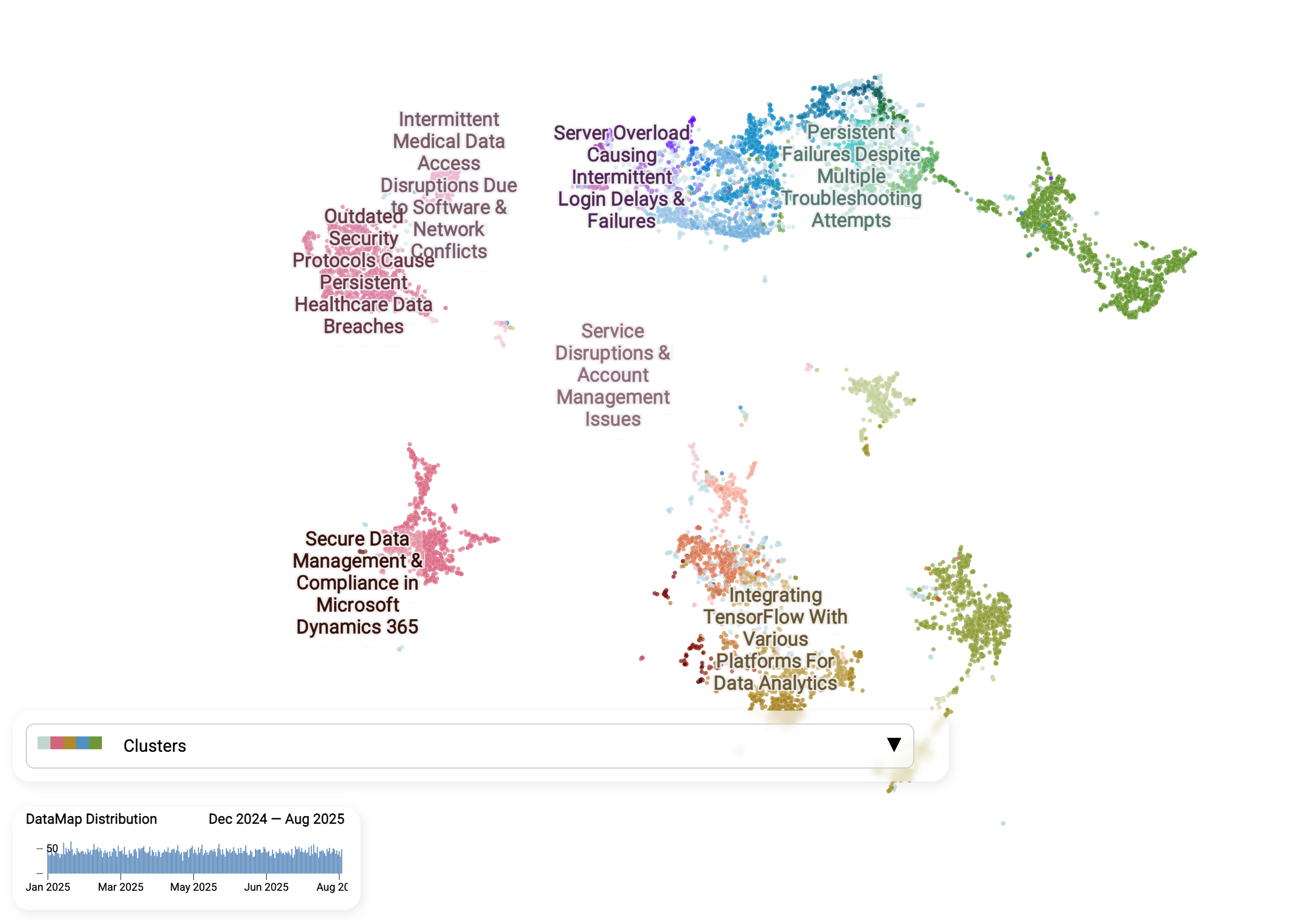
Figure 1: Top problem clusters over time. Each bubble is a ticket, aggregated into clusters that share similar properties.
This map is a visual snapshot of the dataset, with each dot representing a single conversation between a customer and the support team. It is not a traditional scatter plot or bar chart where categories are defined in advance. Instead, AI discovers categories automatically by reading every ticket, comparing meaning, and letting similar issues find each other.
- Dots close together mean similar issues. By turning each message into a meaning vector, AI can recognize when different customers describe the same kind of problem, even if they use different words or languages.
- Clusters emerge naturally. Unlike static ticket categories, these groups are not predefined. They form from the actual language customers use, so hidden patterns surface. Examples include “Server overload causing login delays”, “Persistent failures despite troubleshooting”, and “Secure data management in Microsoft Dynamics 365”.
- AI-generated labels make clusters usable. The system names each cluster so teams can quickly see what the real problems are instead of reading ticket IDs.
- Trends become trackable. The timeline shows when issues spike, allowing teams to spot emerging problems early and act before they spiral.
AI transforms a noisy inbox into an organized map of problems. Teams can zoom from broad themes to precise sub-issues, while agents can use these insights to provide faster and more consistent responses.
Zoom into one cluster: Server overload to intermittent login failures
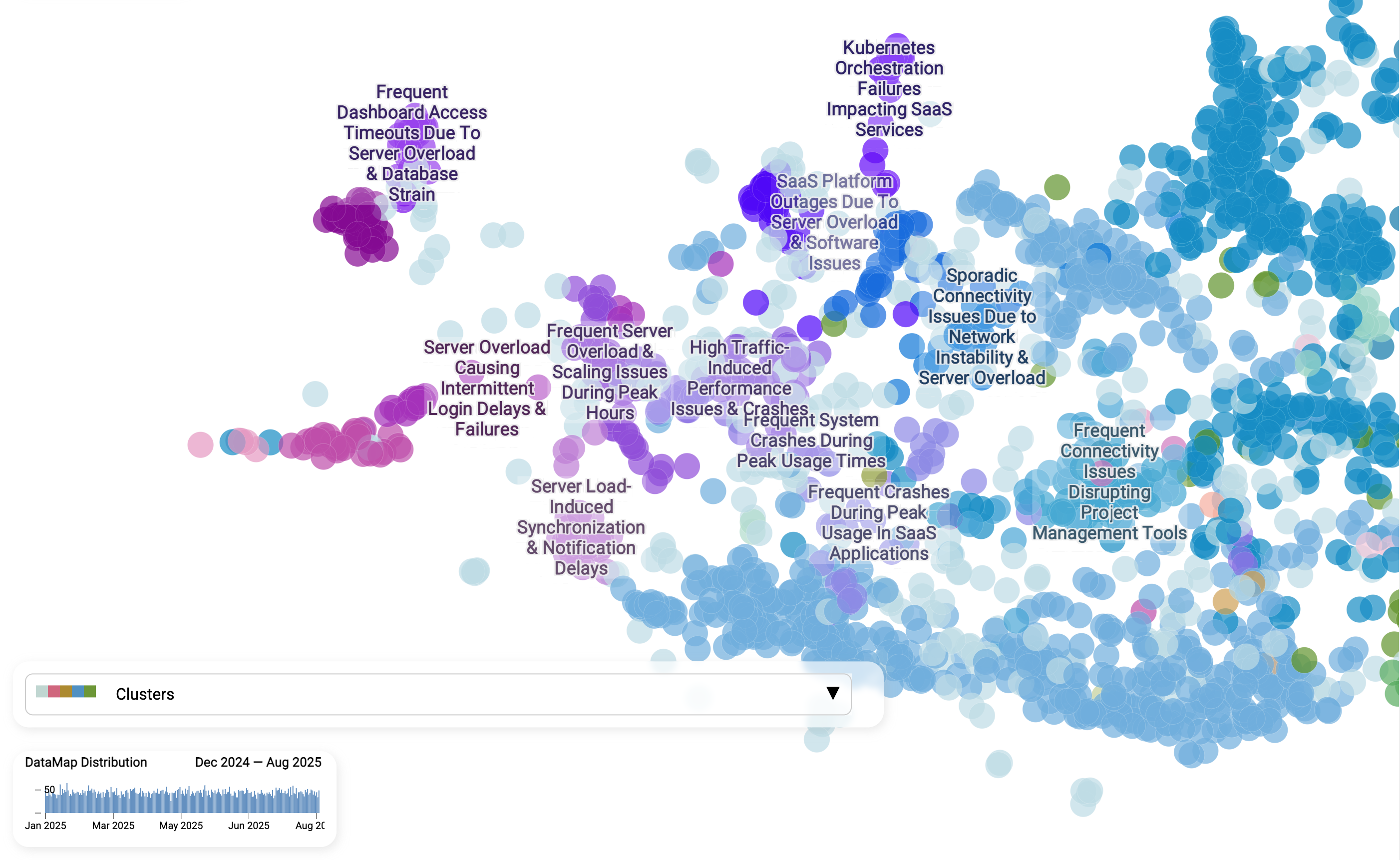
Figure 2: Zoom view for the “Login failures” cluster.
Here we zoom into one specific cluster: Server overload to intermittent login failures. Each dot is still a single ticket. Customers describe login issues in different ways, but AI recognizes the shared meaning.
Sub-clusters reveal nuance inside the broader theme:
- Server overload during peak hours
- Scaling issues causing slow logins
- Notification and synchronization delays linked to load
- Frequent crashes when traffic spikes
Instead of seeing “Login issues” as one vague bucket, teams get a structured breakdown of different causes. This makes it easier to assign ownership, prioritize fixes, and craft more precise responses.
This zoom view shows how AI does not just group tickets into generic piles. It organizes them into a living hierarchy: broad themes at the top, specific failure modes underneath. That is the high-resolution view static categories cannot provide.
Is “Login failures” a new problem or an ongoing one?
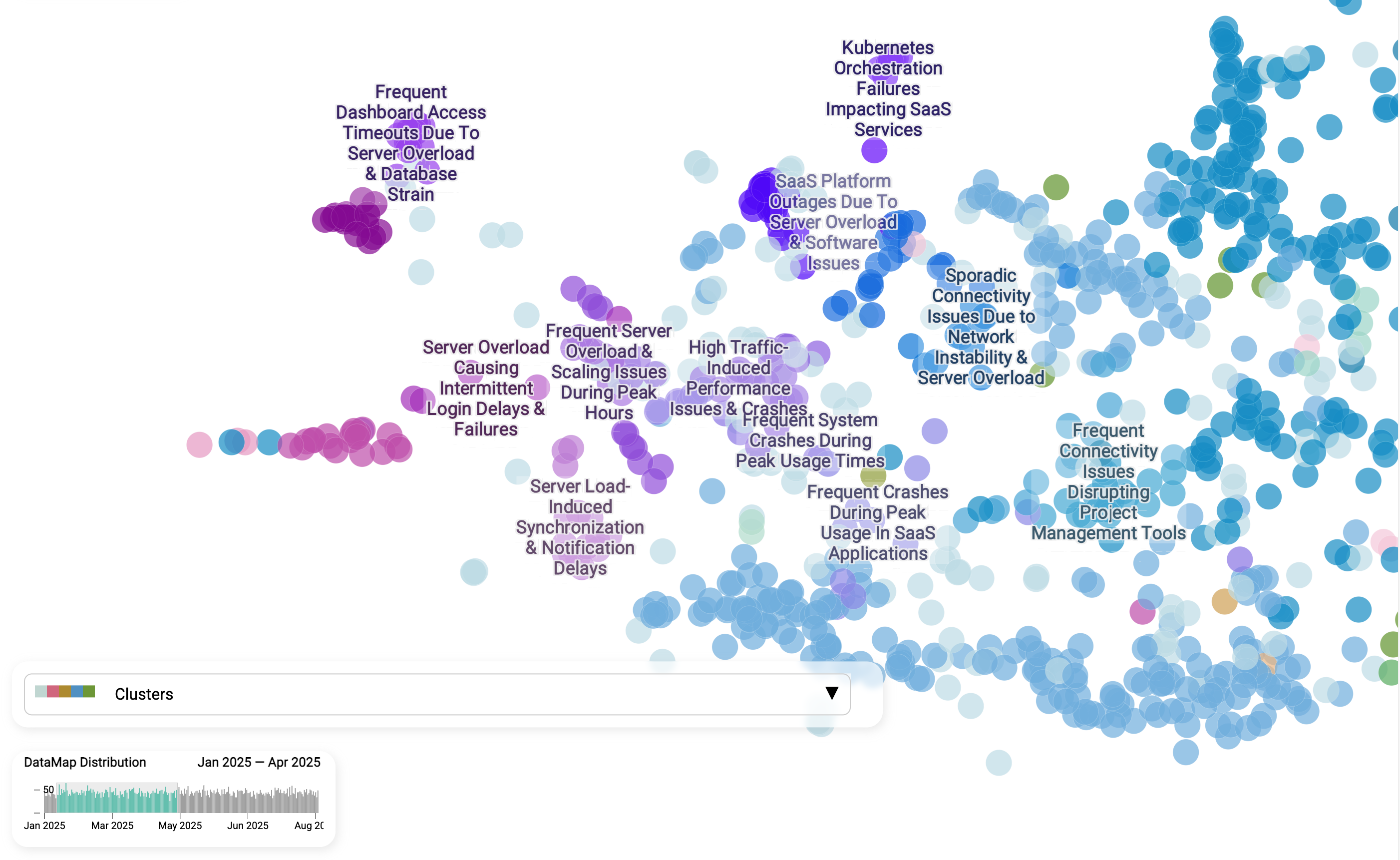
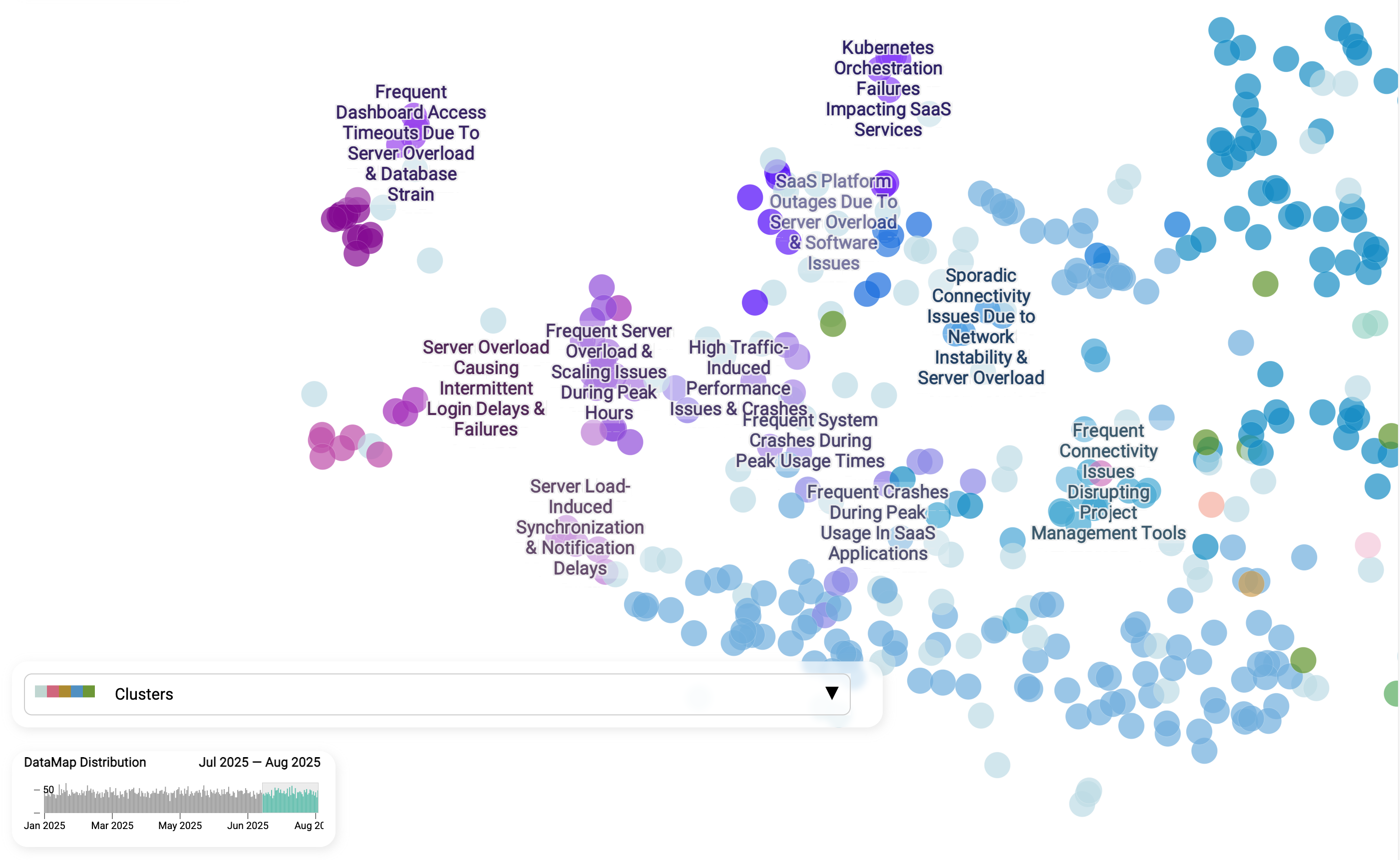
Figure 3: Trend over time for “Login failures”.
Imagine a story that can happen in any organization: after an authentication config release on Friday, a team member receives multiple emails from customers reporting login problems. The team is confused because they did not expect issues from the change. Is it a coincidence, or did the new release really cause login problems?
A data map aggregating real-time cases can reveal this information in seconds. When we compare the Login failures cluster from January-April with July-August 2025, the story becomes clear: this is not a one-off glitch, but a persistent unresolved issue. The same sub-themes - server overload, peak-hour scaling problems, and synchronization delays - appear across both timeframes.
This kind of view separates chronic pain points from new incidents. Instead of guessing whether a spike in support tickets is tied to a recent release or represents a long-standing weakness, teams can see patterns over time, assign accountability, and invest in structural fixes.
Hear customers in their own words
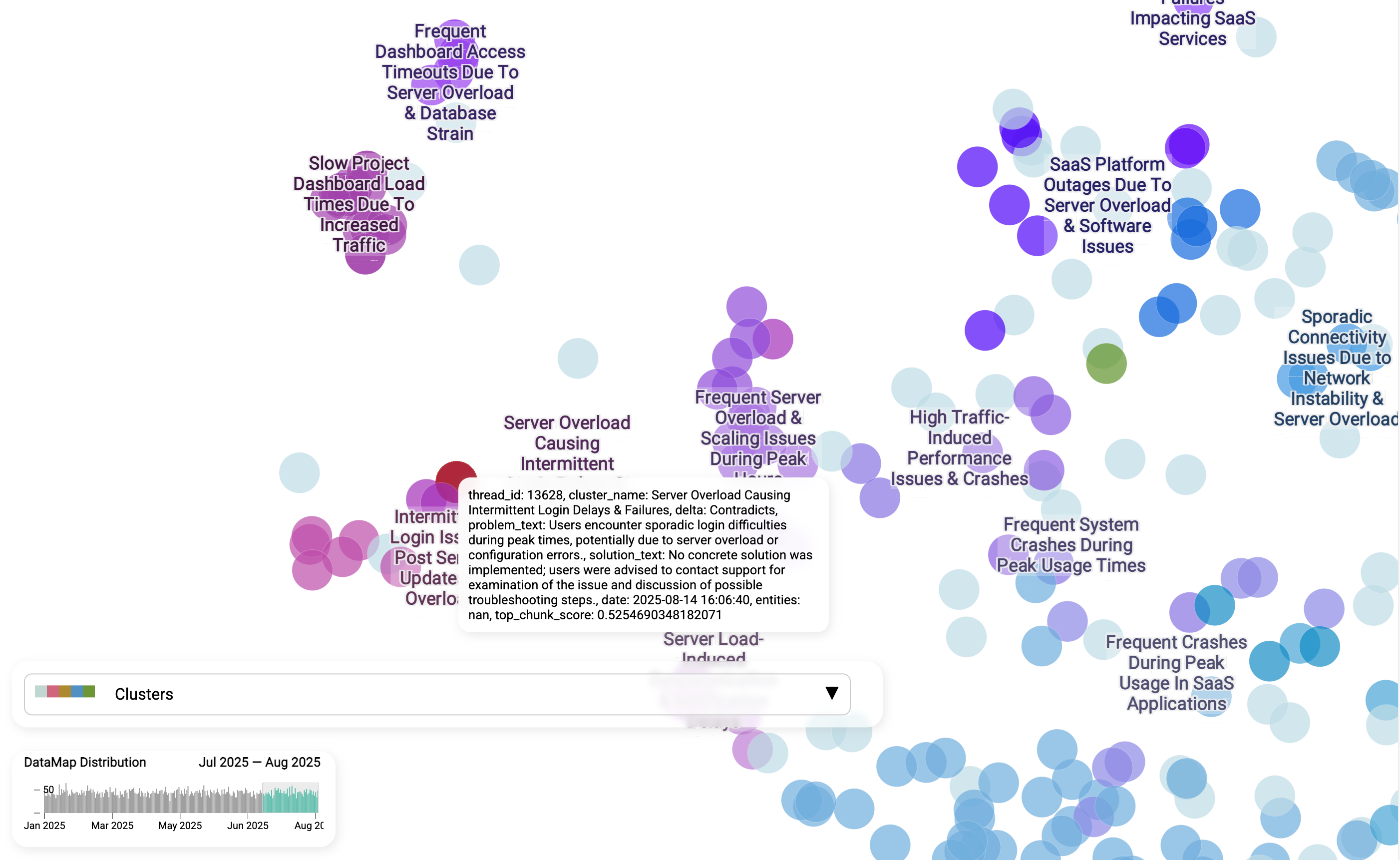
Figure 4: Representative tickets. Short snippets illustrate phrasing and context that agents should mirror in replies.
Beyond clusters and labels, we can zoom into individual tickets to hear customers in their own words. Each snippet shows how people actually describe the problem: “sporadic login difficulties during peak times”, “slow project dashboard load”, or “no concrete solution was implemented”.
This gives teams a ground-level perspective that numbers alone cannot provide. Leaders can see the real customer experience, while support agents can mirror the same phrasing and context in their replies. That makes responses feel more relevant and helps ensure that solutions are aligned with how users actually articulate their pain.
How it works
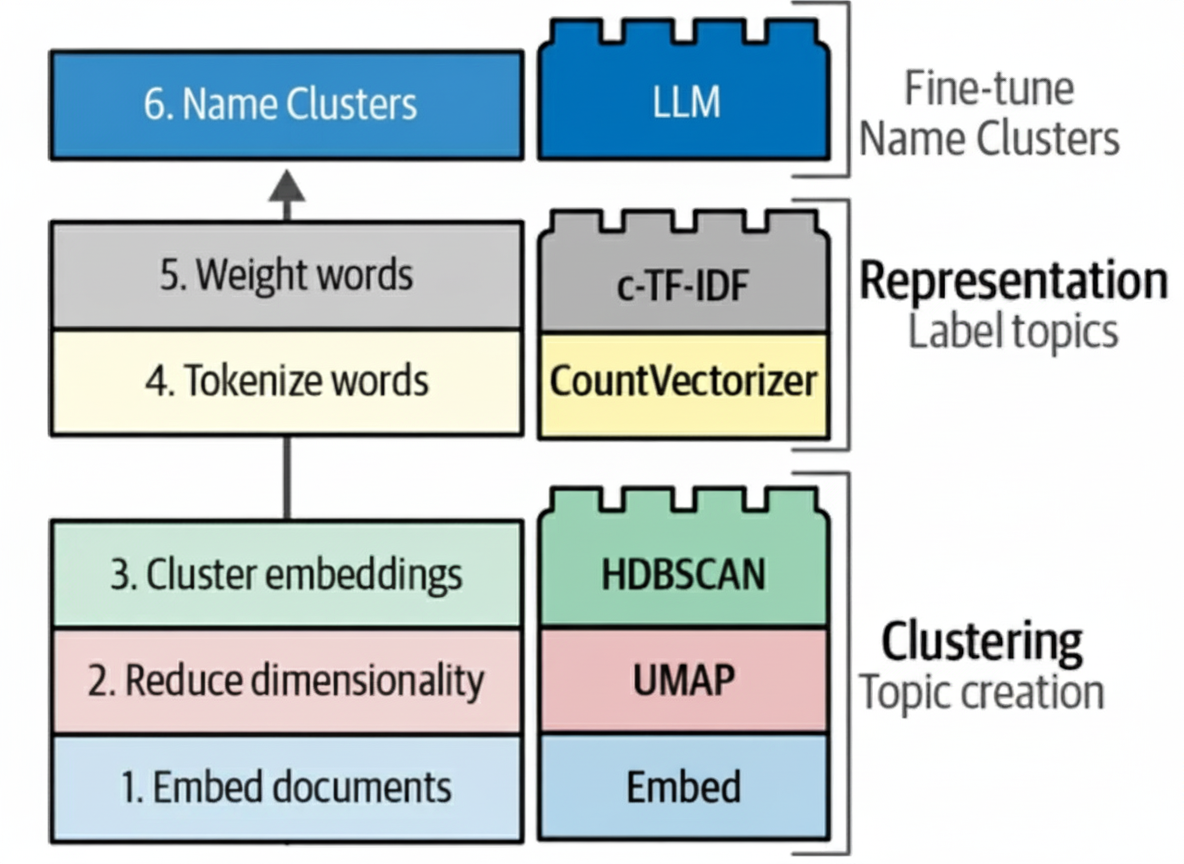
Figure 5: Building blocks for transforming raw support conversations into structured topics: document embeddings, UMAP dimensionality reduction, HDBSCAN clustering, topic labeling, c-TF-IDF, and reranking.
Step 1: Turn messy conversations into tidy records
We use an AI assistant to read each ticket thread and capture four fields: problem, solution, solution steps, and entities such as product, version, or region. The assistant double-checks itself and retries when uncertain.
Step 2: Group similar issues
Each problem is turned into a numeric meaning vector, or embedding. Similar tickets sit near each other, so we can build clusters from broad themes down to specific sub-issues. To achieve this, we combine semantic embeddings, similarity search, hierarchical clustering, topic modeling, and labeling.
Step 3: Name, monitor, and act
We attach short human-readable labels to clusters, build dashboards to spot spikes and trends, and link each cluster to a unified response and an owner. That closes the loop from insight to action.
LLM agents handling new tickets can use cluster context and representative solution records to answer, triage, or escalate in real time. This grounds responses in prior knowledge and reduces hallucination risk.
From insight to action: LLM-based agents closing the loop
Your team already owns the goldmine: past tickets and proven replies. When organized into clusters and themes, this corporate memory becomes the foundation for LLM-based agents that can handle new issues more effectively.
- Grounding in real history. Instead of inventing answers, agents can pull from representative past cases: phrased the way customers actually talk and resolved the way experts actually solved them. This reduces hallucination risk and keeps responses aligned with company policies.
- Context-aware triage. By surfacing trending clusters, LLM agents can tailor replies to the moment, explaining today’s hot issue with more empathy and precision.
- Hierarchical reasoning. Frameworks like Chain-of-Agents or Data Interpreter map naturally onto the layered structure of support problems: broad categories at the top, specific root causes below.
- Smart context engineering. With limited context windows, not every ticket history fits. Aggregated cluster views let agents select the most relevant examples and compressed summaries, improving accuracy while controlling cost.
In practice, LLM agents do not start from scratch. They stand on thousands of prior resolutions, turning past experience into faster answers, fewer escalations, and smarter decisions.
Summary
By turning messy inboxes into structured records, clusters, and clear visuals, support teams gain a high-resolution view of customer pain points. They can see what is trending, trace issues back to root causes, and coordinate unified responses. When paired with LLM-based assistants, these insights close the loop by delivering faster replies, fewer escalations, and a healthier backlog.
Resources
[1] Customer IT Support - Ticket Dataset